If you've got anything to do with Sharepoint development you've surely heard that Patrick passed away on 3rd Sept 2008.
Isn't it strange how we can mourn a loss of someone who we've never met? But I feel that the Sharepoint community has suffered a great loss.
Although I've never met the man I feel that he was the type of guy who would not have regrets and would have lived life to the fullest.
This is a reminder to all of us that we are only here for a limited amount of time. We should ensure the time we spend on this earth is spent well and to the benefit of the community as a whole. Which I think Patrick has achieved with his work.
Patrick you will be missed by all.
Sunday, September 21, 2008

HTTP Error 401.2 after SPS 2003 deployment
I'm in the process of creating a development server to mirror my production server. After deploying SPS2003 I attempted to browse to http://localhost/default.aspx and got: " HTTP Error 401.2 - Unauthorized: Access is denied due to server."
After a little Googling I found this post.
Basically you need to check that "Integrated Windows authentication" is enabled for your Web site in IIS.
After a little Googling I found this post.
Basically you need to check that "Integrated Windows authentication" is enabled for your Web site in IIS.
Monday, September 8, 2008
Sharepoint solution file error
I tried to run the following command:
C:\Program Files\Common Files\Microsoft Shared\web server extensions\12\BIN>stsadm -o addsolution -filename ChansFunkyFeature.wsp
And got this:
Object reference not set to an instance of an object.
ChansFunkyFeature.wsp: The Solution installation failed.
I found this was caused by me not having the right permissions to add this solution file to sharepoint.
To resolve:
Click "Start"
Right click on "Command Prompt".
Click "Run as..."
Enter in credentials for a user who does have access to add the solution to your sharepoint environment.
*For you console types:
runas /profile /user:putYourDomainHere\putUsernameHere CMD
Enjoy.
C:\Program Files\Common Files\Microsoft Shared\web server extensions\12\BIN>stsadm -o addsolution -filename ChansFunkyFeature.wsp
And got this:
Object reference not set to an instance of an object.
ChansFunkyFeature.wsp: The Solution installation failed.
I found this was caused by me not having the right permissions to add this solution file to sharepoint.
To resolve:
Click "Start"
Right click on "Command Prompt".
Click "Run as..."
Enter in credentials for a user who does have access to add the solution to your sharepoint environment.
*For you console types:
runas /profile /user:putYourDomainHere\putUsernameHere CMD
Enjoy.
Wednesday, July 16, 2008
WSS 3.0 / MOSS Region settings
I'll get straight to it. If you live outside of the US you may have noticed that your WSS 3.0 / MOSS server maybe defaulted to the US region settings. Diplaying dates in the mm/dd/yyyy format. Being an Aussie we like our dates in the dd/mm/yyyy format. After a bit of poking around I found this.
You can change this by going to this layout page: http://sharepointServer:22335/_layouts/regionalsetng.aspx
Obviously change your server name and port number. This can also be done for your Central Admin.
You can change this by going to this layout page: http://sharepointServer:22335/_layouts/regionalsetng.aspx
Obviously change your server name and port number. This can also be done for your Central Admin.
Wednesday, July 9, 2008
Sharepoint Solution Deployment Failure
Hi everyone,
I came across an issue where a Sharepoint solution failed to complete it's deployment. Leaving me in a state where I had no options, only an error message in Central admin:
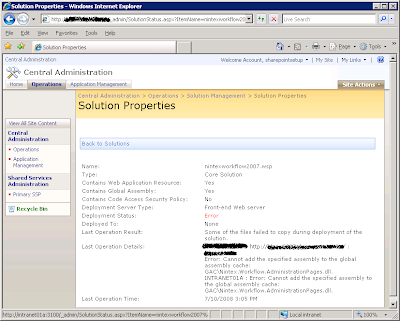 I found this post. But that didn't help me.
What did help were these two STSADM commands:
STSADM -o enumdeployments
STSADM -o canceldeployment -id *your guid here*
Get the ID from the first command and place it into the bit.
This is just a clean up. Not a fix. But it's better than leaving something in a stuck state.
Good luck!
-Chan
I came across an issue where a Sharepoint solution failed to complete it's deployment. Leaving me in a state where I had no options, only an error message in Central admin:
 I found this post. But that didn't help me.
What did help were these two STSADM commands:
STSADM -o enumdeployments
STSADM -o canceldeployment -id *your guid here*
Get the ID from the first command and place it into the
This is just a clean up. Not a fix. But it's better than leaving something in a stuck state.
Good luck!
-Chan
Sunday, June 15, 2008
Embedding a resource in your ASP.NET 2.0 assembly
While developing a web part for Sharepoint I came across an issue where I needed to have Javascript manipulate elements in the web part. I searched around for the best way to include my Javascript file as part of my Sharepoint solution and came across many articles but I couldn't get their methods to work until I came across this one:
http://www.codeproject.com/KB/aspnet/MyWebResourceProj.aspx
I'm not sure why but "Page.ClientScript.GetWebResourceUrl" seems to work for me but "Page.ClientScript.RegisterClientScriptResource" as per this article doesn't.
http://www.codeproject.com/KB/aspnet/MyWebResourceProj.aspx
I'm not sure why but "Page.ClientScript.GetWebResourceUrl" seems to work for me but "Page.ClientScript.RegisterClientScriptResource" as per this article doesn't.
Wednesday, June 11, 2008
Dynamically set the onclick attribute of a html element using Javascript
I've been trying to dynamically set the onlick attribute of a span element in Javascript.
I tried a couple of things including:
var newNavNode = document.createElement("span");
newNavNode.onclick = "horizontalNavClick('"+nodeValue+"');" ;
But this wasn't working as a reference to the function was needed and not a string.
I googled and found this post: http://codingforums.com/archive/index.php?t-55356.html
And modified my script to:
var newNavNode = document.createElement("span");
newNavNode.onclick = new Function("horizontalNavClick('"+nodeValue+"')");
This worked like a charm. Thanks Willy Duitt!
Happy scripting everyone!
I tried a couple of things including:
var newNavNode = document.createElement("span");
newNavNode.onclick = "horizontalNavClick('"+nodeValue+"');" ;
But this wasn't working as a reference to the function was needed and not a string.
I googled and found this post: http://codingforums.com/archive/index.php?t-55356.html
And modified my script to:
var newNavNode = document.createElement("span");
newNavNode.onclick = new Function("horizontalNavClick('"+nodeValue+"')");
This worked like a charm. Thanks Willy Duitt!
Happy scripting everyone!
Subscribe to:
Posts (Atom)